Dashboard, Quota & Cost 儀表板、額度與成本
What the dashboard tracks, where the numbers come from, and how the per-day free-quota indicator decides when to warn you. 儀表板追蹤什麼、數字怎麼算、每日免費額度的警示燈何時亮起。
The dashboard is your at-a-glance view of TypeLate usage. Everything here lives in your local SQLite database — there’s no telemetry server collecting it. This page explains what each number actually means.
儀表板是 TypeLate 使用情況的一目了然視圖。這裡的所有數字都存在你本機 SQLite 資料庫 — 沒有任何遙測伺服器在收。這頁解釋每個數字到底代表什麼。
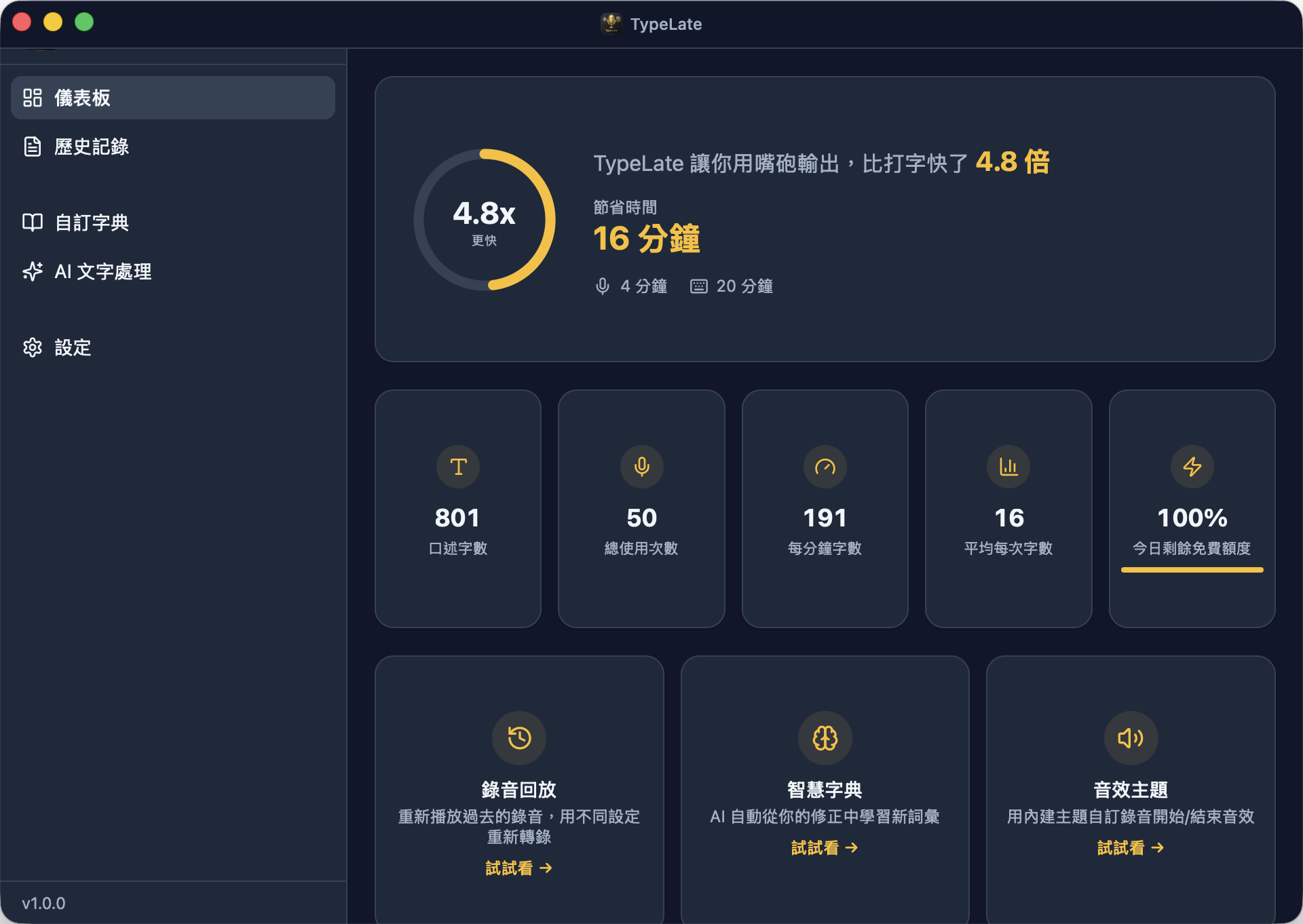
Top-line stats
| Stat | What it counts |
|---|---|
| Transcriptions | Total successful + failed-but-saved transcription records. |
| Characters transcribed | Sum of charCount across all records (post-enhancement when applicable). |
| Recording time | Total milliseconds of audio recorded, formatted human-readable. |
These come straight from the transcriptions SQLite table. No rounding, no sampling.
| 統計 | 內容 |
|---|---|
| 轉錄次數 | 所有成功 + 失敗但已存檔的轉錄紀錄總和。 |
| 轉錄字元數 | 所有紀錄 charCount 加總(有強化的話算強化後)。 |
| 錄音時長 | 已錄音訊毫秒數加總,以人類可讀格式呈現。 |
這些直接來自 SQLite transcriptions 表,無捨入、無取樣。
Derived metrics
These are computed in-client every time you open the dashboard:
Speed multiplier
speedMultiplier = (estimatedTypingTime) / recordingDuration
The “estimated typing time” assumes you’d have typed the same text at 40 characters per minute. Speaking is roughly 3–5× faster than typing, so a multiplier above ~3 is healthy.
Estimated time saved
timeSaved = max(0, characters / 40 × 60000ms − recordingDuration)
How long you would have spent typing the same content at 40 cpm, minus the time you actually spent recording. Don’t take this as gospel — it’s a back-of-envelope number, not an audit.
Characters per minute
cpm = characters / (recordingDuration / 60000)
Your effective speaking-to-text throughput.
Average characters per transcription
avg = characters / transcriptions
Useful for sanity-checking — if this is 5, you’re using TypeLate for one-word commands; if it’s 500, you’re doing long dictation.
每次打開儀表板都會在前端重算:
速度倍率(speed multiplier)
speedMultiplier = (估算的打字時間) / 錄音時長
「估算的打字時間」假設你以 每分鐘 40 字元 的速度打同樣的文字。語音通常比打字快 3–5 倍,所以倍率超過 3 算正常。
預估省下時間(time saved)
timeSaved = max(0, 字元數 / 40 × 60000 毫秒 − 錄音時長)
用 40 cpm 速度打同樣內容會花的時間,扣掉你實際錄音的時間。別當聖經 — 這是粗估,不是審計報告。
每分鐘字元數(characters per minute)
cpm = 字元數 / (錄音時長 / 60000)
你「語音變文字」的有效輸出速度。
每次轉錄平均字元數
avg = 字元數 / 轉錄次數
用來自我檢查 — 如果是 5,你大概都在下短指令;如果是 500,你在做長段口述。
30-day usage trend
A simple bar chart showing transcription count per day for the last 30 calendar days. Today’s bar is highlighted; days with zero activity render as empty slots so the timeline always shows 30 columns.
There’s no zoom or date-range picker — the chart is intentionally low-friction. If you need richer analytics, exporting from History gives you the raw data to load into anything you want.
簡單的長條圖,顯示過去 30 天每日的 轉錄次數。今天的柱子會標亮;零活動的日子留空,時間軸永遠顯示 30 格。
沒有縮放也沒有日期選擇器 — 圖表刻意做得簡單。需要更深入的分析,可以從歷史紀錄匯出原始資料載入到任何工具裡。
Cost tracking
TypeLate computes an estimated upper-bound cost per API call and stores it in the api_usage table. Important caveats:
- The dashboard does not display total cost — it’s recorded in the database but not surfaced. (Future feature; the data is already there if you query the SQLite file yourself.)
- Costs are conservative ceilings, not exact billing:
- Whisper:
max(audioDurationMs, 10000) / 3600000 × costPerHour— minimum-billed at 10 seconds (Groq’s policy) and using the model’s published per-hour rate. - LLM:
tokens × max(inputCostPerMillion, outputCostPerMillion) / 1,000,000— uses the more expensive of input/output rate so you can never over-shoot the real bill.
- Whisper:
- Pricing constants live in
modelRegistry.tsandapiPricing.ts. If a provider changes pricing, historical records keep the old estimate — re-running cost reports won’t retroactively recompute.
TypeLate 會為每次 API 呼叫計算一個保守的 成本上限 並存進 api_usage 表。幾個重點:
- 儀表板 目前不顯示 總成本 — 資料庫有存,UI 還沒呈現(未來功能;現在你自己查 SQLite 檔案也讀得出來)。
- 成本是 保守上限,不是實際帳單:
- Whisper:
max(音訊毫秒, 10000) / 3600000 × 每小時費率— 最少以 10 秒計費(Groq 政策),費率取模型公告值。 - LLM:
tokens × max(輸入費率, 輸出費率) / 1,000,000— 取輸入/輸出較高者,確保不會低估實際帳單。
- Whisper:
- 費率常數寫在
modelRegistry.ts與apiPricing.ts。供應商改費率時,過去紀錄會保留舊的估計 — 重跑報告不會回溯重算。
Free quota indicator
The provider tile on the dashboard shows a colored bar / chip indicating how much of today’s free quota you’ve used. The colour reflects the most depleted dimension across:
- Whisper requests per day
- Whisper audio duration per day (e.g. Groq’s 28,800 sec / day = 8 hrs)
- LLM requests per day
- LLM tokens per day
| Colour | Remaining |
|---|---|
| Green | ≥ 50 % |
| Yellow | 20 – 49 % |
| Red | < 20 % |
Limits come from API rate-limit headers when the provider returns them; otherwise TypeLate falls back to its hardcoded defaults per model.
What happens at zero: TypeLate doesn’t pre-emptively block you. The next API call returns 429 (rate limit) or 403 (quota exceeded) and the HUD shows a clear error. The quota counter resets at provider-defined midnight (typically UTC).
儀表板上每個供應商的卡片會用彩色長條/膠囊顯示今日免費額度用量。顏色取自 剩餘最少的那個維度:
- 每日 Whisper 請求數
- 每日 Whisper 音訊長度(例如 Groq 是 28,800 秒 / 天 = 8 小時)
- 每日 LLM 請求數
- 每日 LLM tokens
| 顏色 | 剩餘 |
|---|---|
| 綠 | ≥ 50 % |
| 黃 | 20 – 49 % |
| 紅 | < 20 % |
額度盡量從供應商回傳的 API rate-limit headers 取;沒有 header 時用 TypeLate 內建的每模型預設值。
額度用完會怎樣:TypeLate 不會主動擋你。下一次 API 呼叫會回傳 429(速率限制)或 403(額度耗盡),HUD 會顯示清楚錯誤。額度在供應商規定的時區午夜重置(通常是 UTC)。
Failed transcription recovery
When a transcription fails — a network blip, a 5xx from the provider, the circuit breaker opening — TypeLate keeps the audio file and tags the record status = 'failed'. If any failed records still have audio (i.e. the recording wasn’t Don't Keep), a recovery banner appears at the top of the dashboard:
N failed transcriptions can be retried.
Click Review to jump to History filtered to failed records; from there you can retry each one individually with current settings (same flow as Re-transcribe — see Audio & Recordings).
Auto-retry isn’t enabled at this layer — the in-call exponential-backoff retry already covers transient failures (see Privacy & Reliability). The banner is for the gave-up-after-3-tries category that needs your judgement.
The banner remembers when you dismiss it (recoveryBanner.dismissed in localStorage) and won’t return until the next failed-with-audio record appears.
當轉錄失敗 — 網路抖動、供應商 5xx、斷路器跳開 — TypeLate 會保留音訊檔並把該筆紀錄標為 status = 'failed'。只要還有失敗紀錄保有音訊(也就是不是用 不保留 政策),儀表板頂部就會顯示 救援橫幅:
有 N 筆失敗的轉錄可以重試。
點 Review 跳到歷史紀錄並過濾為失敗項,可以逐筆用當前設定重試(流程跟 Re-transcribe 一樣 — 見 音訊與錄音)。
這層不啟用自動重試 — 呼叫內的 exponential-backoff retry 已經處理短暫故障(見 隱私與可靠性)。橫幅針對的是「重試 3 次仍失敗」這一類需要你判斷是否要繼續的場景。
橫幅會記住你關閉的狀態(recoveryBanner.dismissed 存在 localStorage),下一筆「失敗但仍有音訊」的紀錄出現前都不會再彈出。